RustQuit
Automatically quits macOS apps when their last window closes - a small, defensive menu bar utility, built in Rust. Free and open source (AGPLv3).
The red ✕ finally means quit
On macOS, clicking the red ✕ closes a window but leaves the app running. RustQuit fixes that: when an app's last window closes, the app is quit gracefully, exactly like pressing ⌘Q - save dialogs still appear, nothing is ever force-quit.
It is a from-scratch, native replacement for the unmaintained SwiftQuit, designed around the failure modes that plagued it: apps like Firefox, iTerm2, and Discord that never delivered the events SwiftQuit waited for are handled reliably - even Discord's hide-instead-of-close trick is seen through.

Features
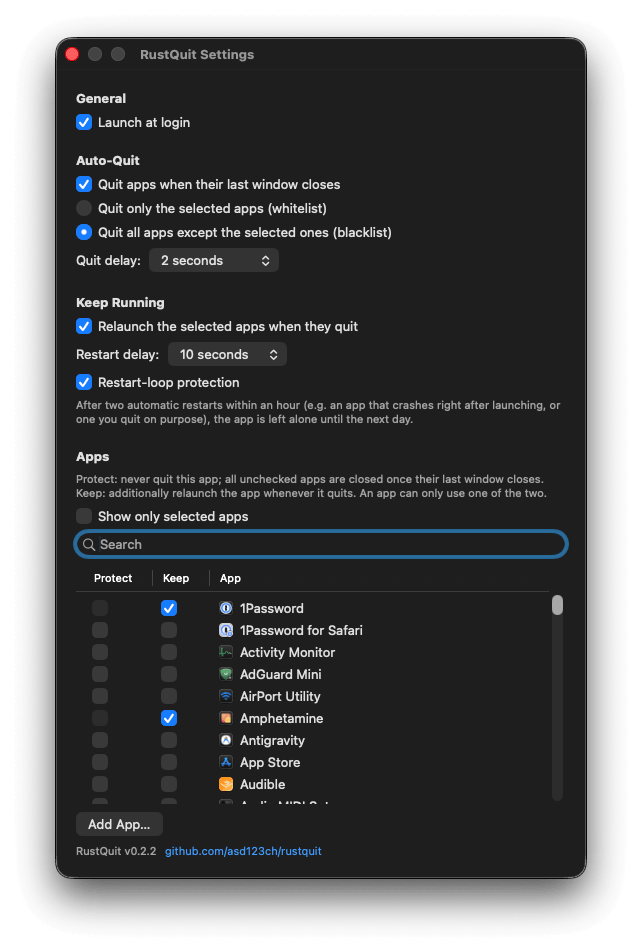
- Whitelist mode (default): quit only the apps you select - or blacklist mode: quit everything except the ones you select
- Configurable delay (0.05-10 s): a window opening within the delay cancels the quit, protecting against tab-close misfires
- Keep running, the reverse direction: selected apps are relaunched automatically after a crash or an update, with restart-loop protection
- Recently Quit menu: the last few auto-quit apps, one click to reopen
- Native settings window with a searchable app list, launch at login, and a clear menu bar status when the Accessibility permission is missing
- Only regular apps with a Dock presence are ever considered - menu bar utilities and background services are ignored
Defensive by architecture
- RustQuit never trusts a cached window count: it counts again before every decision, and anything it cannot verify keeps the app alive
- Termination is always the polite ⌘Q kind - unsaved work is never lost to a force-quit
- A hard-coded protection list keeps system components like Finder, Dock, and accessibility tools untouchable in three layers - even a hand-edited config file cannot make RustQuit touch them
- No telemetry, no updater, no network client, no persistent logs by default - configuration lives in one user-only local TOML file
Requirements & install
macOS 13 or newer (Apple Silicon or Intel), Xcode Command Line Tools, and stable Rust. Like RDP123, there is deliberately no prebuilt download - you build the app on your own Mac in a few commands, so it never gets the quarantine flag, needs no Apple account, and came from the source in front of you.
The full build guide, the protected-apps list, and the detailed comparison with SwiftQuit are in the README on GitHub.